Posture app for Mac
Catch the stress you don't notice.
Gentle nudges for people who live on screens. Fix your posture, and the small tense habits behind it, before they turn into aches. Your camera images never leave your Mac.
14 days free, then $29 once. For Apple Silicon Macs with macOS 15 or later.
Poxture is a Mac app. Open poxture.com on your Mac to download.
Download the Mac app anywayHunched for hours, and you never felt it.
Who it's for: people who code, write, design, study or sit in calls all day, get absorbed in the work, and lean in without noticing.
You sit down feeling fine. Then the work gets interesting. Your head creeps toward the screen, your hand ends up propping your chin, and you stay like that for an hour without realizing. You find out at 6 pm, when your neck is stiff.
The fix is easy once you notice: sit back, drop your hand. What's hard is noticing in the moment, while you're focused on something else.
Poxture notices for you. It checks once a minute through your Mac's camera, and when it sees one of these habits, a soft glow appears around the notch at the top of your screen. Sit back and it fades at the next check.
Leaning in.
Your face creeps toward the display while you read, write or code.
A hand at your chin.
Chin on your palm or fingers in your beard, the pose you slip into when you're thinking hard. It's easy to hold it for an hour without noticing.
Looking down is fine.
Glancing at your keyboard or your notes doesn't count against you.
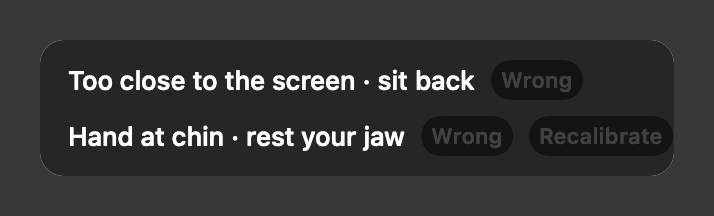
Hover over the glow to see what Poxture saw, for example "Hand at chin · rest your jaw". By default, if the glow is still there after 30 seconds, it chimes once. You can turn the chime off.
You don't want a camera watching you all day.
Neither would we. Here is what Poxture does with your camera, and what you can see for yourself.
Worry:A camera on me all day.
What happens:By default the camera turns on for a few seconds at each check, once a minute, and is off in between.
Worry:It's recording me.
What happens:Poxture looks at each frame on your Mac and keeps numbers, not video.
Worry:I paused it and the camera stayed on.
What happens:When you pause, lock your screen or your Mac sleeps, the camera is off.
Worry:It'll drain my battery.
What happens:By default the camera is off between checks, and each check is a short look of a few frames.
Your camera images never leave your Mac.
Poxture looks at each frame on your Mac and keeps numbers, not video. No image or video is ever sent anywhere.
The camera is off between checks by default.
The green light comes on for a few seconds once a minute, then goes dark.
Check it: watch the light.
Turn off Wi-Fi. Poxture keeps working.
The checks, the glow and your history all run on your Mac, so none of them needs a connection.
Check it: turn off Wi-Fi and use your Mac as usual.
Pause means off.
Pause Poxture or lock your screen, and the camera stops.
Check it: the light stays dark until you're back.
No video, ever.
Poxture keeps numbers, like how far you lean, never a video. At each alert it keeps one photo, so you can see how you were sitting, unless you turn Keep photos off in Settings. Photos stay on your Mac, stay out of Time Machine and are deleted after 7 days by default. You can delete them all in Settings.
Check it: Settings, Keep photos.
Sit the way you sit. Hear about it only when you drift.
If an app dings you every time you lean forward two inches, you'll uninstall it within a day. And you already know what comfortable looks like for you.
So that's the baseline. When you set Poxture up, you sit the way you normally sit when you feel fine, then lean all the way in to the screen. That gives it your own range, and it only reacts when you drift past your normal.
- Too touchy, or not enough? Choose Relaxed, Normal or Strict.
- Got it wrong? Hover over the glow and click Wrong. The glow goes away. If that happens twice in a day, Poxture offers to recalibrate.
- New chair or desk? Recalibrate in the same two steps.
Forget it's running until you drift.
A reminder that's too gentle gets tuned out. One that nags gets deleted within a week. One that stops working after your screen locks, or keeps the camera on until your battery is gone, is worse than none.
Set Poxture up once and it's there every workday, in the menu bar, quiet until you drift.
- Checks once a minute. Pick anything from every 15 seconds to every 5 minutes.
- By default the camera is on for a few seconds at each check and off in between.
- Pause for an hour, or until you resume. Or keep it watching and hide the glow for an hour.
- Stops when your screen locks or your Mac sleeps, and starts again when you're back.
- It opens at login and stays out of the Dock.
- The glow shows on every display you use.
- Light on your Mac: about 1 % of one processor core and under 100 MB of memory (measured on an M2 Max with macOS 27).
- See today's score, and a history of each alert drawn as a simple outline of how you sat.
Try it on your own workday before you pay.
Not sure it suits the way you work? You shouldn't have to buy it to find out, or chase a refund if it doesn't.
$29 once. Try it free for 14 days. There's no subscription, and you don't need an account. The trial has every feature.
Buying opens soon. For now, download the free trial.
Needs an Apple Silicon Mac (M1 or later) with a built-in camera, and macOS 15 or later.
Poxture is a Mac app. Open poxture.com on your Mac to download.
Download the Mac app anywayBefore you try it
Does it record video of me?
No. Poxture reads each frame on your Mac and keeps numbers, like how far you lean, never a video. It keeps one photo per alert, on your Mac only, for 7 days by default, unless you turn Keep photos off in Settings.
Could my camera images leave my Mac?
No. Poxture looks at each frame on your Mac and keeps numbers, not video. No image or video is ever sent anywhere. What it keeps, and how to check the camera yourself, is on the privacy page.
Is the camera on all the time?
No. By default the camera turns on for a few seconds at each check, once a minute, and is off in between. If you'd rather keep it on between checks, there's a switch in Settings. When you pause, lock your screen or your Mac sleeps, the camera is off.
Will it nag me?
It glows quietly at the top of your screen and chimes once if you stay drifted for 30 seconds by default. You can turn off the chime, check less often, hide the glow for an hour or pause it.
What if it flags me when I'm sitting fine?
Click Wrong on the alert and it goes away. If it keeps happening, recalibrate, or switch to Relaxed in Settings.
Does it work with an external webcam or a closed MacBook?
Not yet. Poxture uses your Mac's built-in camera.
Does it work on Intel Macs?
No. Poxture needs an Apple Silicon Mac (M1 or later) and macOS 15 or later.
Does it run down my battery?
By default the camera is off between checks, and each check is a short look of a few frames.
Can it stop my jaw clenching, or help with TMJ?
Poxture isn't a medical device and doesn't diagnose or treat anything. It can't see your jaw muscles. It notices two habits it can see, leaning in toward the screen and a hand at your chin, and gives you a quiet nudge. If you have jaw or neck pain, talk to a dentist, doctor or physio.
What happens after the 14 days?
Buy Poxture for $29, once, to keep using it. Early builds don't count the trial down yet. When buying opens, you get the full 14 days.
It isn't open source. How do I know what it does with my camera?
You don't have to read the code. Watch the camera light: it comes on for a few seconds at each check and stays dark when you pause or lock your screen. The privacy page lists these checks and what Poxture keeps.
Can I see how my day went?
Yes. The Today tab shows your score for the day, and History shows each alert as an outline drawing of how you sat. Photos, if kept, open only when you click one.
See what you catch in one workday.
Install it, sit the way you always sit, and leave it running until evening.
14 days free, then $29 once. For Apple Silicon Macs with macOS 15 or later.
Poxture is a Mac app. Open poxture.com on your Mac to download.
Download the Mac app anyway